 PushForm
Update, 3 November 2026: The agent can now build editable 3D models and check rendered views of its work. See the new floorplan and cabinet examples. The session and limitations described below are from October.
Every PushForm document has a built-in AI assistant. Open AI Chat from the left-hand bar of the editor and you can ask it how to do something, have it point at the control you need, or (in Layout documents) ask it to draw something for you. It also takes bug reports and feature requests, but that's a topic for another post.
I recorded a short session with it this week, and it's a good example of what it can and can't do.
"How do I import an SVG image into this doc?"
I started by typing that question into a blank Layout page. Here's what happened:
The interesting part is that it doesn't only tell you which button to press. It shows you. The assistant can see the editor's toolbars and menus (their names, routes and whether they're enabled). When it decides you need a particular control, it makes that control glow for five seconds. If the tool sits inside a toolbar dropdown, it opens the dropdown and highlights the right entry.
It also waits. If you click the highlighted control within thirty seconds, the chat notices and carries on with the next step: how to use the tool you just picked. It never clicks anything itself. Highlighting is a hint, not an action, and you're still the one driving.
Help answers come from PushForm's own user documentation, which the assistant searches before it answers. If the docs don't cover a step, it's supposed to say which detail is missing rather than make one up.
Then it corrected itself
"Supposed to" is doing a lot of work there. Here's the start of its next reply, which I think is my favourite thing it has said so far:
Before I start, a correction. My last message gave details about SVG import that the help search didn't return. That covered the embedding, the Shift-resize and the Paste tip. Please ignore those details. I'm going to draw the pelican now.
So it had padded its SVG answer with plausible-sounding details that weren't in the documentation, then caught that on the next turn and flagged it unprompted. I'd rather it hadn't made them up at all, but an assistant that admits it is a lot more useful than one that doesn't. Keeping it to what the docs actually say is something we're still working on.
A pelican riding a bicycle
If you follow AI at all, you've probably seen Simon Willison's pelican riding a bicycle benchmark. You ask a language model to "Generate an SVG of a pelican riding a bicycle" and see what comes out. It's deliberately silly. Pelicans can't ride bicycles, bicycles are hard to draw, and the result shows a lot about a model's spatial reasoning. Here's a recent example rendered from one of Simon's runs.
PushForm's version is a little different. The assistant doesn't write an SVG file. It edits the open Layout document through the same document operations the drawing tools use: circles, lines, polygons, fills and strokes, placed in paper millimeters on the page. What you get is ordinary, editable PushForm geometry, not a picture.
So I asked it:
Can you help me draw a pelican riding a bicycle?
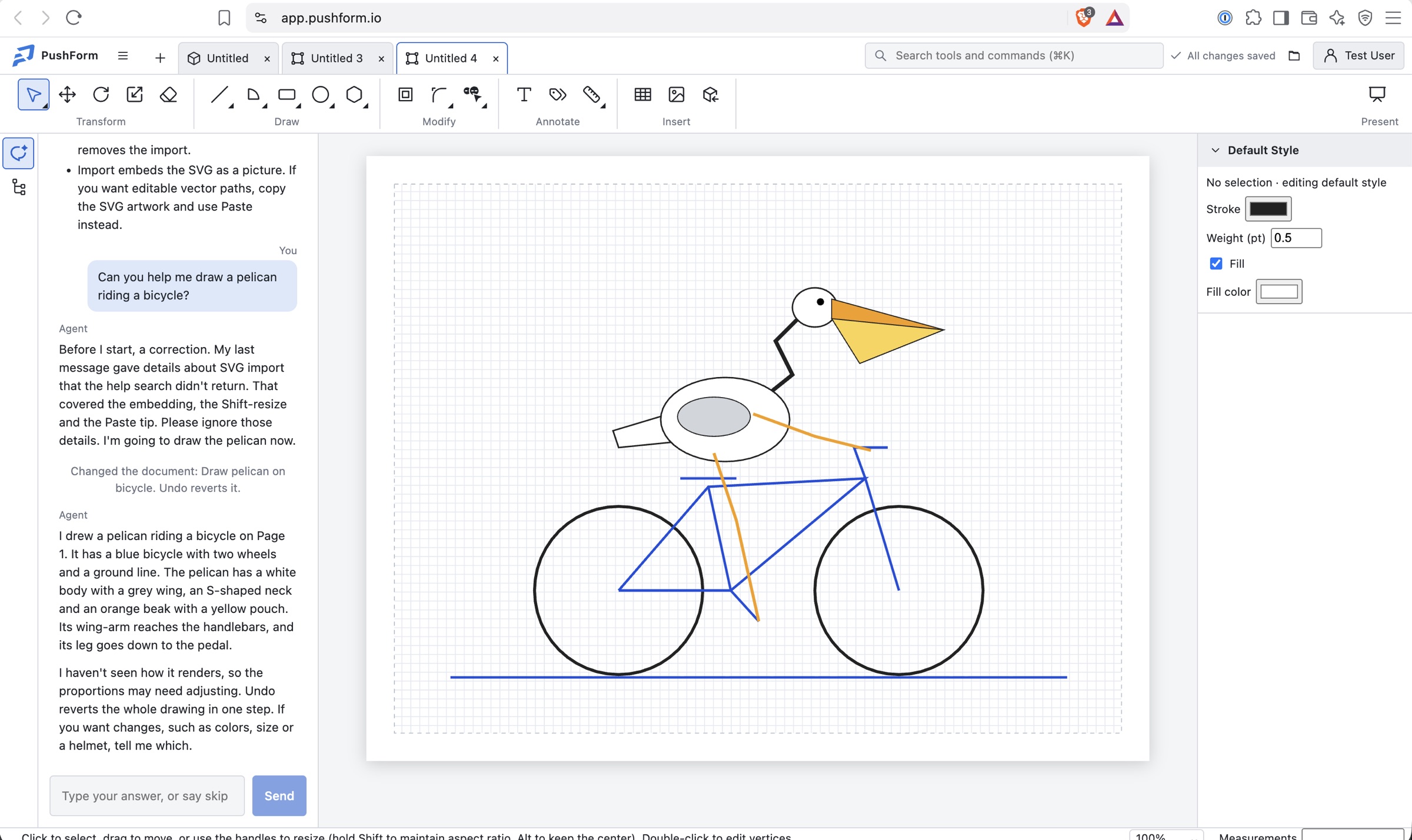
Its summary afterwards:
I drew a pelican riding a bicycle on Page 1. It has a blue bicycle with two wheels and a ground line. The pelican has a white body with a grey wing, an S-shaped neck and an orange beak with a yellow pouch. Its wing-arm reaches the handlebars, and its leg goes down to the pedal.
I haven't seen how it renders, so the proportions may need adjusting. Undo reverts the whole drawing in one step. If you want changes, such as colors, size or a helmet, tell me which.
That second paragraph is accurate, and worth unpacking:
- "I haven't seen how it renders." True. The assistant reads the document's structure (pages, layers, objects and their bounds), but it never sees a rendered image of the page. It drew this blind, from coordinates. Given that, the bicycle is pretty good. The frame forms a proper diamond and the wheels are round and level. The pelican floats a few millimeters above the saddle, and its neck looks more like a lightning bolt than an S, but I've seen far worse from models writing raw SVG.
- "Undo reverts the whole drawing in one step." Also true. Each change the assistant makes goes in as a single labelled undo entry, so the chat shows "Changed the document: Draw pelican on bicycle. Undo reverts it." One Ctrl/⌘+Z and the pelican is gone.
- It only edits when you ask. A question gets an answer, not an edit. It won't change your drawing on its own initiative, or because some text inside the document tells it to.
Why this matters more than pelicans
Nobody needs a pelican on their shop drawings. But "draw a 600 mm by 400 mm rectangle with a title block underneath" or "add a dimensioned outline of the cabinet door" are the same kind of request. Having geometry land in the document as real, editable objects (rather than a flattened image you have to trace over) makes the difference between a toy and a tool.
Some current limitations, so you know what to expect:
- Drawing works in Layout (2D paper) documents. In 3D models the assistant can answer questions and highlight tools, but it can't build geometry for you yet.
- It can't see the result. For anything where proportions matter, check what it drew and ask for adjustments.
- It can still get details wrong, as the SVG import answer showed. When it guides you through the app, the highlighted control is the part to trust most, because it comes from the live UI rather than from memory.
You can try all of this at app.pushform.io. Open a Layout document, click the AI Chat button, and ask it for a pelican. If you get a good one, or a terrible one, share it on our Discord. I'd like to start a collection.